ReAct Agents
ReAct Agents
ReAct (Reasoning and Acting) is a powerful agent pattern that combines the reasoning capabilities of Large Language Models with the ability to take actions through tools. This approach allows agents to break down complex problems, gather necessary information, and provide accurate responses.
How ReAct Works
The ReAct pattern follows a cyclical process:
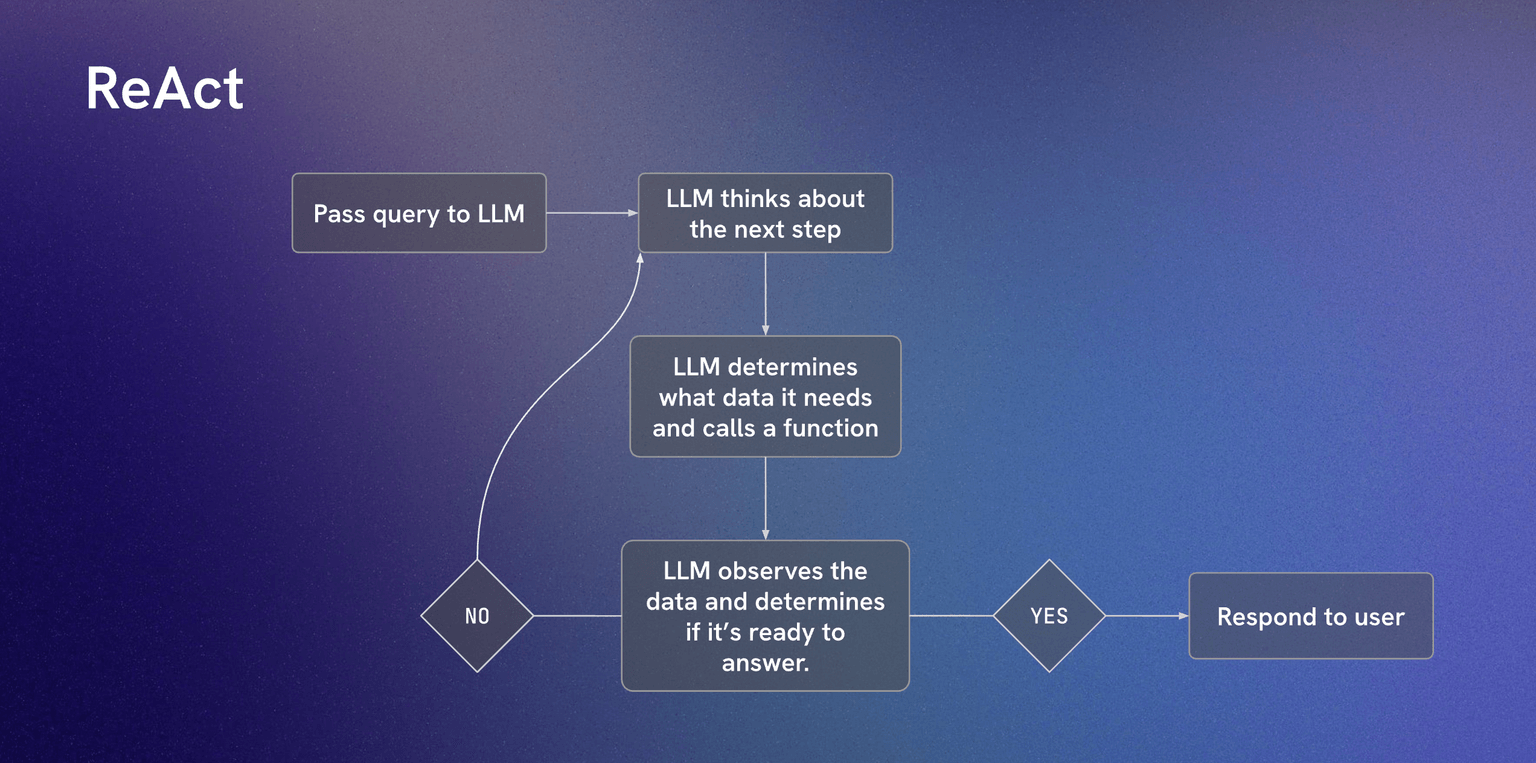 Diagram credit: Scrimba
The process consists of these key steps:
- Pass query to LLM - The user's question is sent to the language model
- LLM thinks about the next step - The model analyzes what information it needs
- LLM determines what data it needs and calls a function - Based on the analysis, the model selects and executes appropriate tools
- LLM observes the data and determines if it's ready to answer - The model evaluates if it has sufficient information
- Decision Point - If not ready, it loops back to step 2; if ready, it proceeds to answer
- Respond to user - The final answer is provided based on all gathered information
ReAct System Prompt Example
Here's a comprehensive system prompt for implementing a ReAct agent:
You are a helpful assistant that uses the ReAct (Reasoning and Acting) framework to answer questions.

Follow this format for each response:

Thought: [Your reasoning about what you need to do next]
Action: [The tool/function you want to call]
Action Input: [The input for the tool]
Observation: [The result of the tool call]
... (repeat Thought/Action/Observation as needed)
Thought: [I now have enough information to answer]
Final Answer: [Your final response to the user]

Available tools:
- getLocation: Get the user's current location
- getCurrentWeather: Get weather information for a location
- searchWeb: Search the web for information
- calculate: Perform mathematical calculations

Rules:
1. Always start with a Thought
2. Only use the available tools listed above
3. If you don't have enough information after using tools, continue the cycle
4. Provide a Final Answer only when you have sufficient information
5. Be specific and accurate in your responses
ReAct in Action
Here's how a ReAct agent handles a user query:
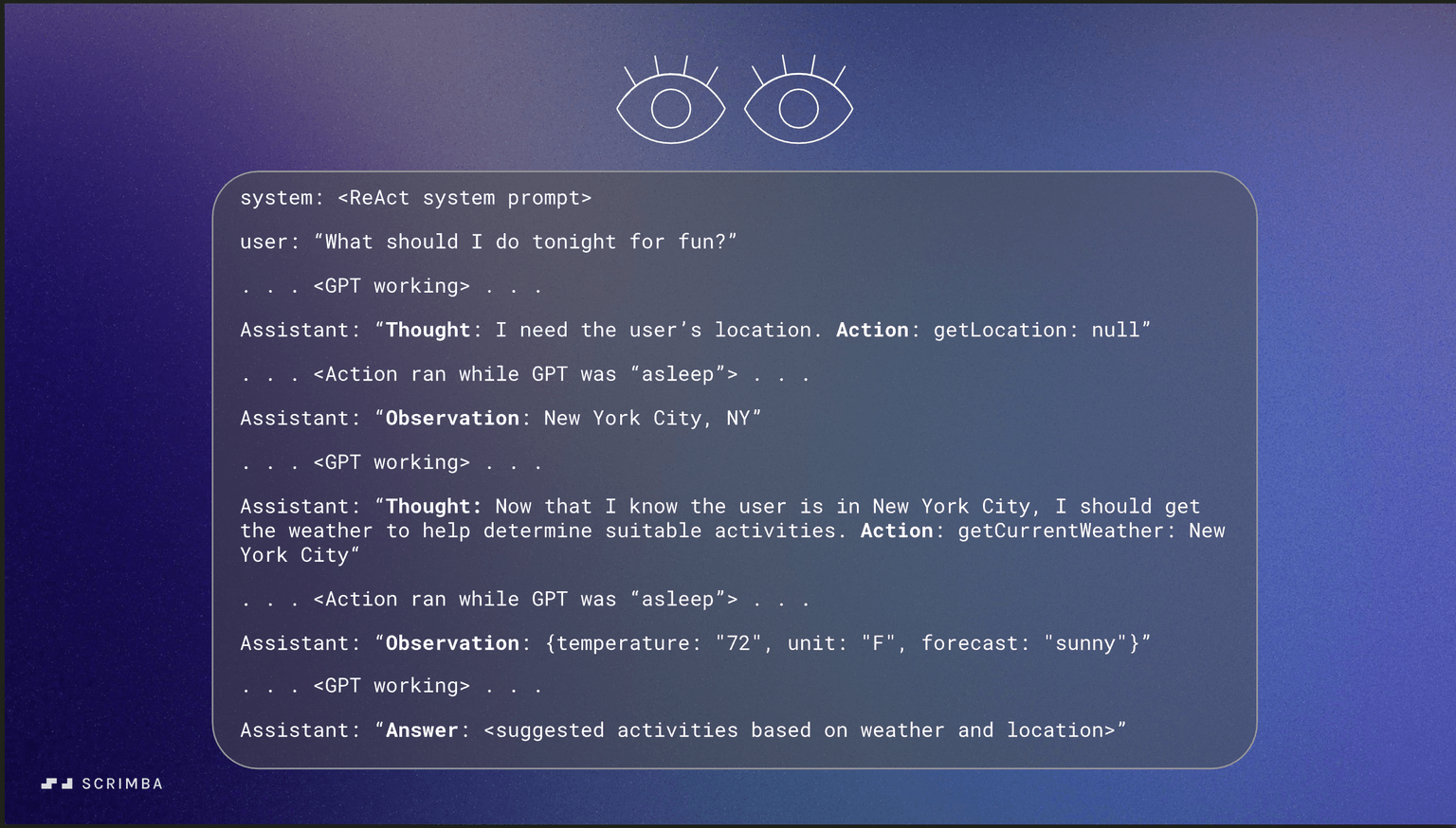 Diagram credit: Scrimba
Example Interaction:
User: "What should I do tonight for fun?"
Agent Response:
Thought: The user wants suggestions for fun activities tonight. To provide good recommendations, I should know their location and current weather conditions, as these factors affect what activities are suitable.

Action: getLocation
Action Input: {}
Observation: New York City, NY

Thought: Now I have the user's location. I should check the current weather to suggest appropriate activities for tonight.

Action: getCurrentWeather
Action Input: {"location": "New York City, NY"}
Observation: Temperature: 72°F, Clear skies, Low humidity

Thought: Perfect! I have the location (New York City) and weather information (clear, pleasant weather). Now I can suggest appropriate fun activities for tonight.

Final Answer: Based on your location in New York City and the clear, pleasant weather (72°F), here are some great options for tonight:

1. **Outdoor Activities**: Take a walk in Central Park, visit a rooftop bar with city views, or enjoy outdoor dining

2. **Entertainment**: Catch a Broadway show, visit a comedy club, or explore the nightlife in areas like Greenwich Village

3. **Cultural**: Visit museums that have evening hours, attend a live music venue, or explore art galleries

4. **Social**: Meet friends at a local restaurant, join a trivia night at a bar, or attend a community event

The clear weather makes outdoor activities particularly appealing tonight. What type of experience are you most interested in?
Practical Implementation Example
Here's a complete JavaScript implementation of a ReAct agent using OpenAI's API:
import OpenAI from "openai"
import { getCurrentWeather, getLocation } from "./tools"

export const openai = new OpenAI({
    apiKey: process.env.OPENAI_API_KEY,
    dangerouslyAllowBrowser: true
})

const availableFunctions = {
    getCurrentWeather,
    getLocation
}

/**
 * Goal - build an agent that can answer any questions that might require knowledge about my current location and current weather at my location.
 */

const systemPrompt = `
You cycle through Thought, Action, PAUSE, Observation. At the end of the loop you output a final Answer. Your final answer should be highly specific to the observations you have from running
the actions.
1. Thought: Describe your thoughts about the question you have been asked.
2. Action: run one of the actions available to you - then return PAUSE.
3. PAUSE
4. Observation: will be the result of running those actions.

Available actions:
- getCurrentWeather:
    E.g. getCurrentWeather: Salt Lake City
    Returns: current weather of the location specified.
- getLocation:
    E.g. getLocation: null
    Returns: user's location details. No arguments needed.

Example session:
Question: Please give me some ideas for activities to do this afternoon.
Thought: I should look up the user's location so I can give location-specific activity ideas.
Action: getLocation: null
PAUSE

You will be called again with something like this:
Observation: "New York City, NY"

Then you loop again:
Thought: To get even more specific activity ideas, I should get the current weather at the user's location.
Action: getCurrentWeather: New York City
PAUSE

You'll then be called again with something like this:
Observation: { location: "New York City, NY", forecast: ["sunny"] }

You then output:
Answer: <Suggested activities based on sunny weather that are highly specific to New York City and surrounding areas.>
`

async function agent(query) {
    const messages = [
        { role: "system", content: systemPrompt },
        { role: "user", content: query }
    ]

    const MAX_ITERATIONS = 5
    const actionRegex = /^Action: (\w+): (.*)$/

    for (let i = 0; i < MAX_ITERATIONS; i++) {
        console.log(`Iteration #${i + 1}`)
        const response = await openai.chat.completions.create({
            model: "gpt-3.5-turbo",
            messages
        })

        const responseText = response.choices[0].message.content
        console.log(responseText)
        messages.push({ role: "assistant", content: responseText })
        const responseLines = responseText.split("\n")

        const foundActionStr = responseLines.find(str => actionRegex.test(str))

        if (foundActionStr) {
            const actions = actionRegex["exec"](foundActionStr)
            const [_, action, actionArg] = actions

            if (!availableFunctions.hasOwnProperty(action)) {
                throw new Error(`Unknown action: ${action}: ${actionArg}`)
            }
            console.log(`Calling function ${action} with argument ${actionArg}`)
            const observation = await availableFunctions[action](actionArg)
            messages.push({ role: "assistant", content: `Observation: ${observation}` })
        } else {
            console.log("Agent finished with task")
            return responseText
        }
    }
}

console.log(await agent("What are some activity ideas that I can do this afternoon based on my location and weather?"))
How the Loop Works
The ReAct loop in this implementation follows these key steps:
- Initialization: Start with system prompt and user query in messages array
- Iteration Loop: Maximum of 5 iterations to prevent infinite loops
- Pattern Matching: Use regex to detect
Action: functionName: argumentpattern - Function Execution: Call the appropriate function from
availableFunctions - Context Building: Add each response and observation to maintain conversation context
- Termination: Loop ends when no more actions are found (final answer provided)
Multiple Example Scenarios
Example 1: Weather-Based Activity Planning
Query: "What are some activity ideas that I can do this afternoon based on my location and weather?"
Expected Loop:
- Thought: Need location → Action: getLocation → PAUSE
- Observation: "San Francisco, CA"
- Thought: Need weather → Action: getCurrentWeather → PAUSE
- Observation:
{location: "San Francisco, CA", forecast: ["foggy", "cool"]} - Answer: Indoor activities specific to SF (museums, cafes, shopping)
Example 2: Travel Planning
Query: "I'm planning a trip to Tokyo next month. What should I pack?"
Expected Loop:
- Thought: Need current weather in Tokyo → Action: getCurrentWeather → PAUSE
- Observation:
{location: "Tokyo, Japan", forecast: ["mild", "rainy season"]} - Answer: Packing recommendations for rainy season in Tokyo
Example 3: Local Restaurant Recommendations
Query: "What are some good dinner options near me?"
Expected Loop:
- Thought: Need location → Action: getLocation → PAUSE
- Observation: "Austin, TX"
- Answer: Restaurant recommendations specific to Austin area
Key Implementation Details
Message Management
// Each iteration adds to conversation history
messages.push({ role: "assistant", content: responseText })
messages.push({ role: "assistant", content: `Observation: ${observation}` })
Action Parsing
const actionRegex = /^Action: (\w+): (.*)$/
const foundActionStr = responseLines.find(str => actionRegex.test(str))
Safety Mechanisms
- MAX_ITERATIONS: Prevents infinite loops
- Function validation: Checks if action exists before execution
- Error handling: Throws descriptive errors for unknown actions
Tool Integration
const availableFunctions = {
    getCurrentWeather,  // async function(location)
    getLocation         // async function()
}
This implementation demonstrates the core ReAct pattern with proper loop management, error handling, and real-world tool integration. The agent can handle various queries by dynamically determining what information it needs and using available tools to gather it.
Key Benefits of ReAct
- Enhanced Accuracy: By gathering real-time information, ReAct agents provide more accurate and up-to-date responses
- Transparency: The Thought-Action-Observation cycle makes the agent's reasoning process visible and understandable
- Flexibility: Can handle a wide variety of tasks by combining different tools and reasoning approaches
- Problem Decomposition: Breaks complex problems into manageable steps
- Error Recovery: Can retry actions or try different approaches when initial attempts fail
Implementation Considerations
When building ReAct agents, consider:
- Tool Selection: Choose tools that provide reliable, relevant information
- Error Handling: Implement robust error handling for tool failures
- Context Management: Maintain context throughout the reasoning cycle
- Safety Measures: Include safeguards against malicious tool usage
- Performance: Optimize for reasonable response times
ReAct agents represent a significant advancement in AI capabilities, enabling more sophisticated and helpful interactions that go beyond simple question-answering.